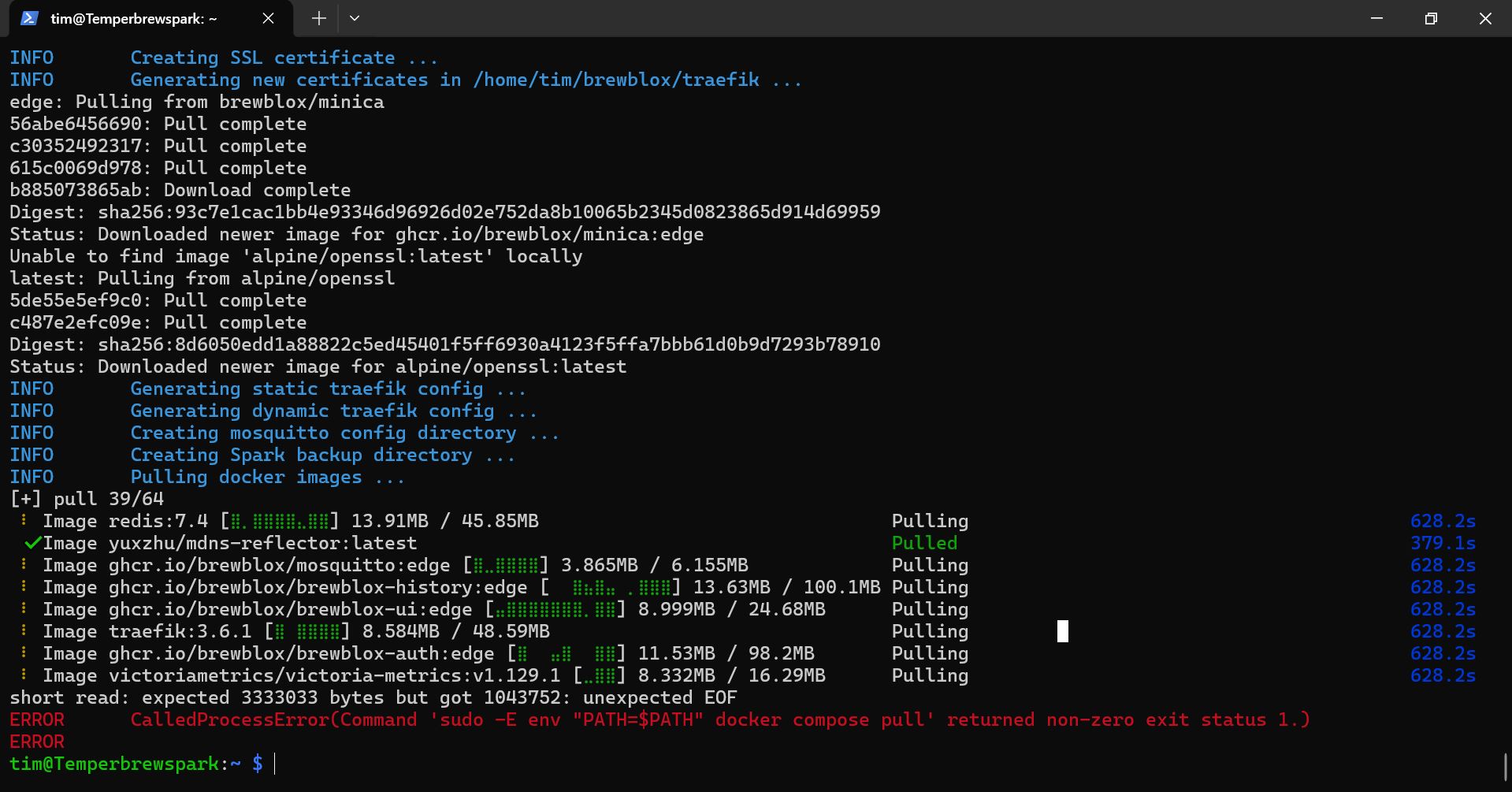
I bought someones 3 vessel setup that he never had a chance to put together. He bought most things other than the vessels from Brew Pi Store. I have to reverse engineer his plans. Everything is coming together but now I am trying to get the software sorted and have tried multiple times to install. The pi installation goes fine but I keep getting this error when trying to install the spark.
What version of PiOS are you running and what version of Pi and Spark do you have? I believe docker now wants a 64 bit installation to install correctly.
It looks like brewblox is failing to install correctly so you haven’t yet reached the step to install the Spark. I have had that issue a couple of times and have found the best fix is to completely delete the Brewblox folder and then reinstalling.
Once it is installed successfully, all subsequent commands have to be run from within the Brewblox folder (e.g., brewblox-ctl add-spark) by typing ‘cd brewblox’.
Thank you for answering. I installed the 64 bit version. It’s a pi 4 witha spark 4.
Yes it doesnt finish the brewblox install. How do I delete only the brewbox folder? I reinstalled the PIOS several times and followed the directions both on a mac and a pc. Tried both 32 and 64 bit but it always shows an error at the same place.
Reinstalling the OS should have reformatted the SD card which would have deleted the folder. If you installed the desktop version of PiOS, you can do it from the file browser. If you have the headless version (as recommended by the instructions), you can use the following command from your user directory (the one shown in your post above): rm -r brewblox.
This can either be done directly on the Pi or by SSH from another computer. If you still have a problem after doing this, let me know and I’ll contact Elco on discord. He responds quite quickly there but doesn’t check the forum very often but will if notified about an issue. You can also join with this link - Brewblox.
I’m assuming you have been following these instructions - Getting Started | Brewblox.
1 Like
Hi Tim1. Welcome.
Just to check before you go and delete that folder, can you give us a screenshot of the output of the following command:
df -h
Hello John,
I found the issue. I was looking through all the troubleshooting posts for anything that was similar. The problem was that before this problem there was like 8 other issues with installing brewblox so everything and nothing seemed similar enough to help. And I had tried to control for every parameter I could think of. I even let AI lead me down endless dead end solutions that also didn’t work.
I found a thread from someone that had one of the problems I had and there was members that couldn’t figure out what was causing his issue until he had a remote support session with Elco where they figured out the the pi was underpowered causing random errors…I was using the pi charger but I was powering the spark through the pi. After giving the spark its own charger it installed everything without an issue.
I already used the quickstart and everything was working great. I will never forget the pi’s ip address for the rest of my life. Thank you for the help. I will likely need it again later. Cheers
Thank you for your help. It’s good to know going forward that I can get some help with things when needed.
Cheers!
Excellent. Got to hear you’re up and running.
Happy brewing!