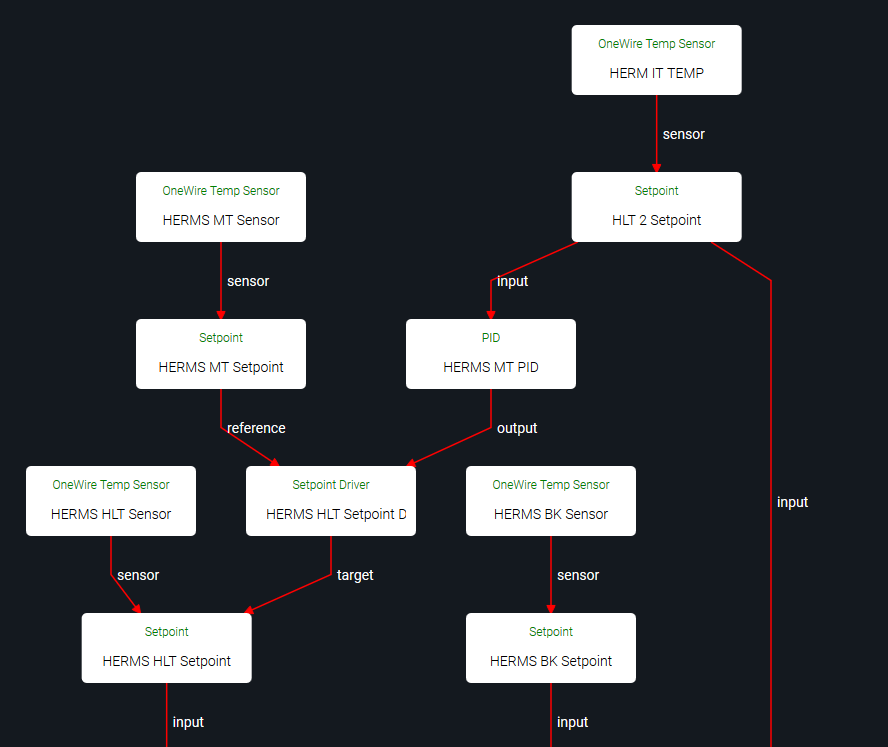
HERM-it elements prefixed with “Coil” due to technical issues with the diagram tool.
Yellow elements are the output from the HERMS wizard. You can rename HLT -> HERM-it in the wizard.
You can create the cyan/HLT elements by copying the BK blocks, as their configuration will be exactly the same.
Hi Bob many thanks for this, I’ll get it set up when I fly home next week, exciting times ahead 
For what it’s worth, we use the same setup and named the kettle with a coil “Heater” and the water tank “HLT”. This is a common design when going over 100-200L for this design, otherwise you loose a lot of reactivity from the Heater (too much water, not dynamic at all).  for adding support, as always Bob
Learn something new every day =)
The wizards on the backlog are due some attention after this release. I’m pretty sure that includes a single kettle wizard.
Hi Bob,
This didn’t work too well, is there a way that the MT temp can control my 4th vessel, the small vessel with the coil inside?
I can’t figure out how to do it, i brewed yesterday but had to keep manually changing the power levels to try & keep the mash temp stable.
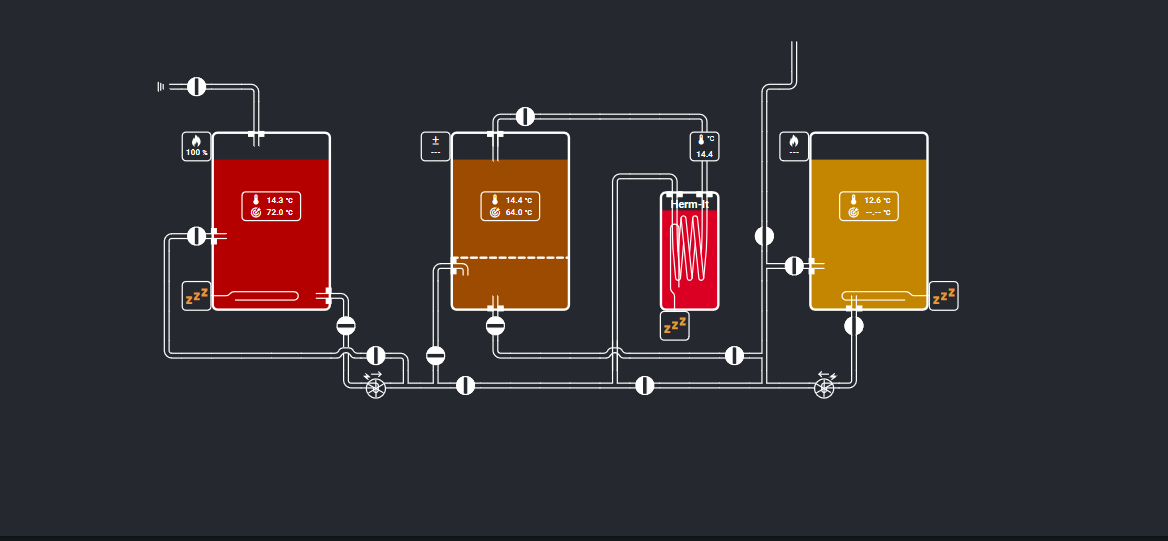
Ideally I’d like to be able to highlight the MT dialog box (Brown Liquid in vessel) & be able to set the temp of the MT, the herm-it coil will heat the wort, I have a temp sensor in the MT & on the outlet of the Herm-it vessels coil, the pump will keep recirculating the wort through the grain bed.
You can click on the setpoint / sensor display in the MT kettle to adjust the setpoint.
That’s the job of the HERMS HLT Setpoint Driver block in your config.
Are all blocks in the chain enabled? You can only manually set power level if the block is not driven (controlled by a block above it in the chain).
Hi Bob,
Thanks for the quick reply, I’m definitely learning the system slowly, but its a bit daunting still.
“You can click on the setpoint / sensor display in the MT kettle to adjust the setpoint” doesn’t do anything you can change the numbers but it has no effect on the element inside the herm-it vessel?
“That’s the job of the HERMS HLT Setpoint Driver block in your config.
Are all blocks in the chain enabled? You can only manually set power level if the block is not driven (controlled by a block above it in the chain)”
Not sure how I’d check if all blocks are enabled?
The block above is HERMS MT PID so definitely driven, I had more control using the original set of blocks you posted but I had both elements firing up, I only require the herm it element to control the MT temperatures, is there a way of all the elements to be controlled independently?
Where I can click on each vessels dialog box & manually set my desired temperatures?
Updating the MT setpoint, and it not changing the Herm-it, indicates that somewhere in the chain a block is disabled.
You can check individual blocks either on the Spark service page, or by clicking on them in the relations diagram. If they’re disabled, they typically show it as a big warning at the top.
In the builder screenshot you posted, it appears that:
- your MT PID is controlling a Setpoint Driver (it uses the +/- icon)
- your MT PID is inactive (no value is shown below the icon)
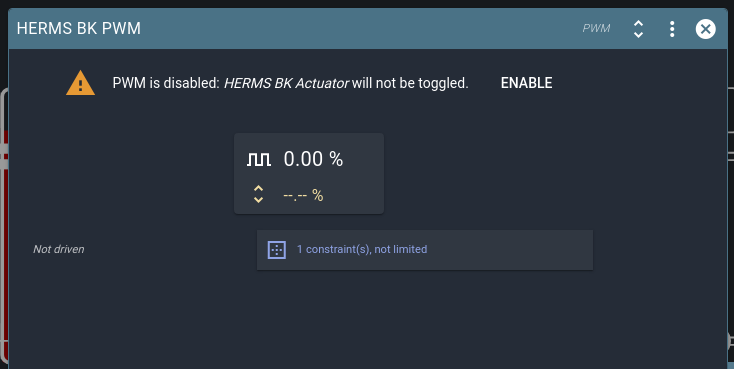
- your HLT PWM is disabled (heating element shows zZz icon)
- your BK Setpoint is inactive / disabled (no setting is shown, only measured temp)
- your BK PWM is disabled (heating element shows zZz icon)
- your Herm-it PWM is disabled (heating element shows zZz icon)
Normally the best approach is to enable all blocks. When you want the system to deactivate, you only need to disable the Setpoints. A PID with a disabled Setpoint will be inactive.
I just checked to be sure, and if you disable your MT Setpoint, it will do a one-time toggle of the HERM-it Setpoint. Afterwards you can manually re-enable the Herm-it Setpoint to switch to manual control.
You can manually control blocks that are not actively driven by another block.
In your case that means you can manually control the Herm-it Setpoint only when the Setpoint Driver / MT Setpoint are not active.
In your brewery layout, you can click on the Setpoints in each kettle to access / edit them.
I suggest adding the Herm-it setpoint to your builder diagram to easily see what’s going on.
We’re aware that the reasons behind enabled/active state of driven blocks get complicated rather fast. I’ll have a look at implementing some convenient overview of what blocks are disabled / inactive, and why.
We don’t currently have a builder part for the Setpoint Driver. I’ll make an issue for it, if only for completeness’ sake.
Thanks Bob I disabled the elements so that picture isn’t the best to explain what was happening, I’m back on site now so don’t have access to my home PC, so can’t access any other pictures of the brewday graphical interface, I will try what you said in your reply & report back, thank you again for taking the time to provide an explanation
still got issues with this, I’m having to manually control the heating element in my fourth vessel, getting frustrated now with this, am I the only person having difficulties to get this to function correctly?
I’ve gone back to the first program that Bob kindly put up me, but I cannot get my fourth vessel to automatically control the mash temp, I have to keep adjusting the power to that element
If you still have the config, could you please export your blocks? (Spark service page, actions menu).
I’ll have a look at it - if a setting is that hard to find, then it is a shortcoming in the UI.
Hi Bob I’ll export the blocks when I return home from work, Wednesday 26th of August, I’m assuming its me thats doing something wrong somewhere as no one else seems to be having any issues, my only difference is that my fourth vessel has about 2 litres of water in it rather than the 35 litres that everyone else has?
I still have a HLT that is used to pump water into my MT & is used for my sparge water, after the sparge is completed, I use my fourth vessel to maintain my mash tun temperature, the wort passes through the fourth vessel that has a heating a heating element in it, after the mash is completed i fly sparge from the HLT into the MT whilst still recirculating through the fourth vessel to maintain the temperatures, once the wort is in the BK, I only use the BK element to boil the wort?
I suspect there’s some overlooked setting somewhere that’s causing trouble.
It’s the kind of thing we’d want to find and fix in your config, so we know where to improve our software so it won’t happen again to others.
I assume you mean UI logs?
brewblox-logs.json (2 Bytes)
You can export your blocks in the Spark service page (top right, actions menu)
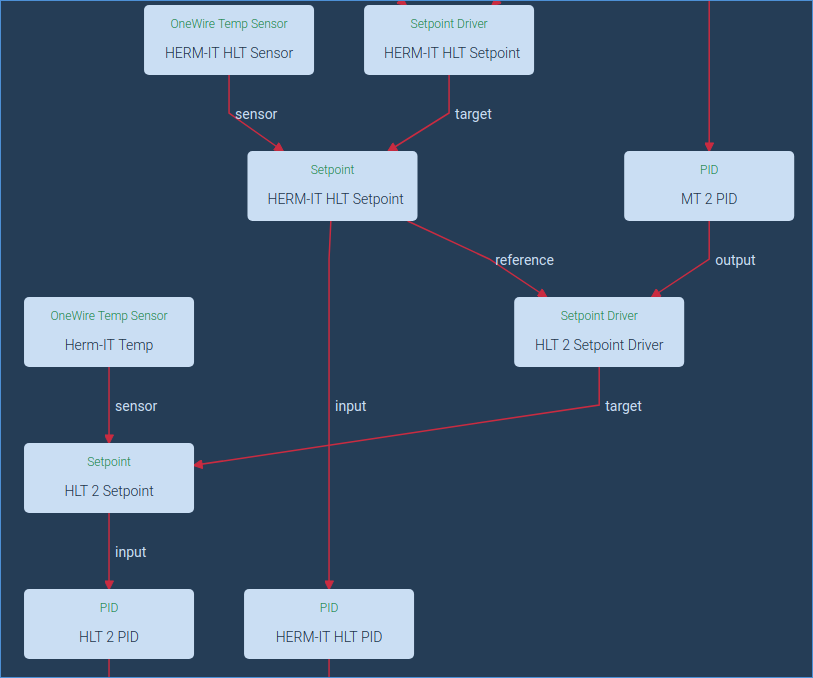
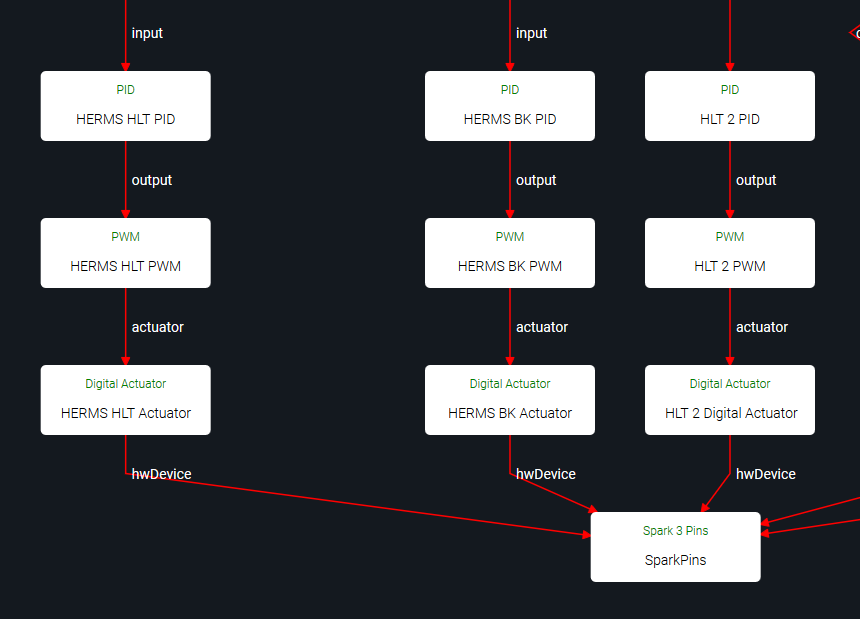
It looks like both your HLT and HLT-2 are currently driven by a Setpoint Driver linked (indirectly) to MT temperature. Is this intentional?
I may have done it inadvertently to try & fix my problem with the fourth vessel not functioning correctly
The MT 2 PID and HLT 2 Setpoint Driver blocks shouldn’t be there.
You have a “HLT 2” chain and a “HERM-IT HLT” chain. I’m not sure which one controls your fourth / HERMS vessel, and which one is your HLT.
Remove the MT 2 PID and HLT 2 Setpoint Driver blocks, and set the target block of HERM-IT HLT Setpoint Driver to the Setpoint controlling your fourth vessel, and your setup should work.