Hello, Thought I would follow the conversation here. I am now on the UI web page which loads fine.
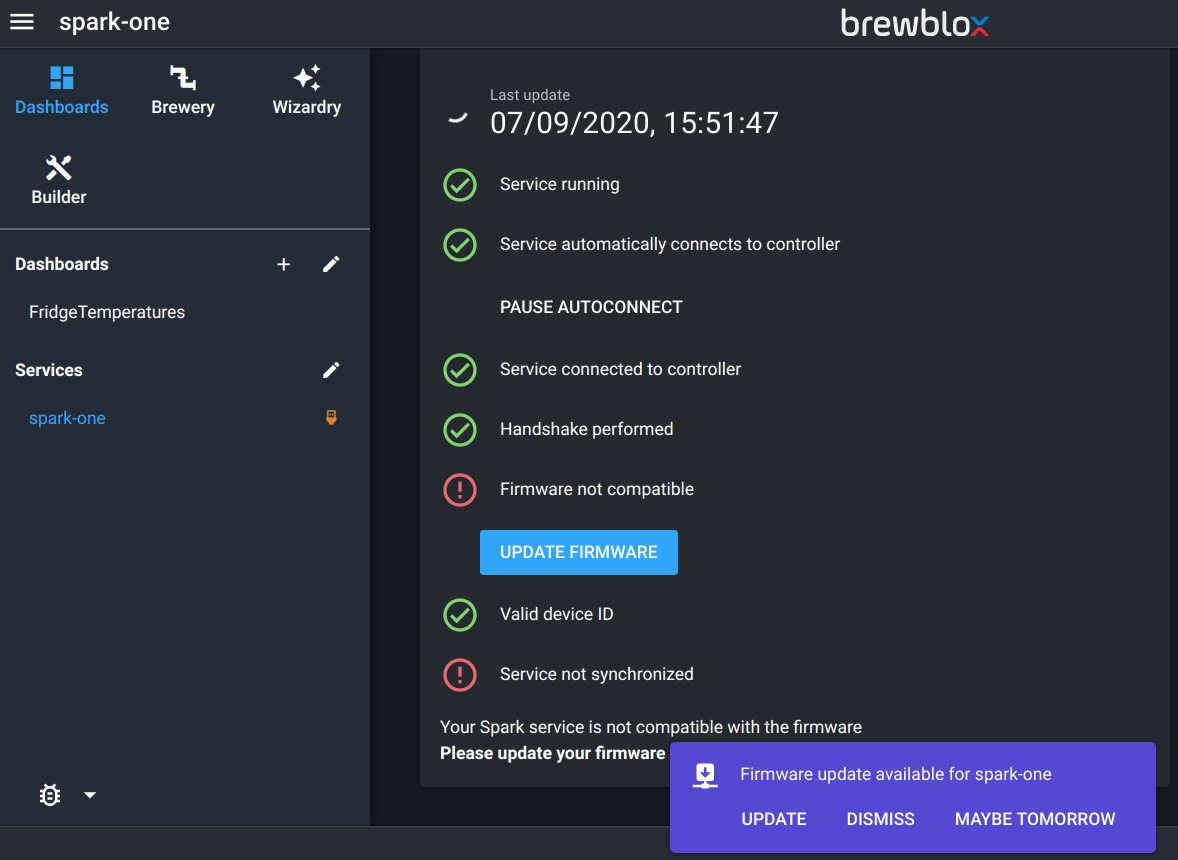
I simply want the dashboard with temperatures to show. Under the Spark-one it offers me to do an update. It was strange because I got a message in the box stating that it should be up to date.
When I do it, I get the following message on the UI:
Update failed: Request failed with status code 424
If retrying the update does not work, please run 'brewblox-ctl flash'

Log messages

Started updating spark-one@/dev/ttyACM0 to version 94793741 (2020-08-24 15:59:14 +0200)

Sending update command to controller

Waiting for normal connection to close

Connecting to /dev/ttyACM0

Failed to update firmware: SerialException([Errno 6] could not open port /dev/ttyACM0: [Errno 6] No such device or address: '/dev/ttyACM0')

Scheduling service reboot
So I went to the terminal and did the following:
pi@raspberrypi:~/brewblox $ brewblox-ctl flash
Please press ENTER when your Spark is connected over USB
INFO       Pulling flasher image...
edge: Pulling from brewblox/firmware-flasher
3cfb62949d9d: Pull complete
1ef8a3a07026: Pull complete
b0a4348231c5: Pull complete
df326638a053: Pull complete
ea880123298f: Pull complete
0859a37932b6: Pull complete
8d15d34ed1fe: Pull complete
472f5e1053bb: Pull complete
3d788ca7e49b: Pull complete
d2cd1c45fa37: Pull complete
6a1ef8b24086: Pull complete
Digest: sha256:59d0c8da6abd437b43ebd4b65e7921cee917c53cc58a8302794ae44eb729042d
Status: Downloaded newer image for brewblox/firmware-flasher:edge
docker.io/brewblox/firmware-flasher:edge
INFO       Stopping services...
Stopping brewblox_datastore_1 ... done
Stopping brewblox_eventbus_1  ...
Stopping brewblox_ui_1        ...
Stopping brewblox_influx_1    ...
Stopping brewblox_history_1   ...
Stopping brewblox_traefik_1   ...
Stopping brewblox_spark-one_1 ...

ERROR: for brewblox_influx_1  UnixHTTPConnectionPool(host='localhost', port=None): Read timed out. (read timeout=210)

ERROR: for brewblox_history_1  UnixHTTPConnectionPool(host='localhost', port=None): Read timed out. (read timeout=210)

ERROR: for brewblox_ui_1  UnixHTTPConnectionPool(host='localhost', port=None): Read timed out. (read timeout=210)

ERROR: for brewblox_traefik_1  UnixHTTPConnectionPool(host='localhost', port=None): Read timed out. (read timeout=210)

ERROR: for brewblox_spark-one_1  UnixHTTPConnectionPool(host='localhost', port=None): Read timed out. (read timeout=210)

ERROR: for brewblox_eventbus_1  UnixHTTPConnectionPool(host='localhost', port=None): Read timed out. (read timeout=210)
ERROR: An HTTP request took too long to complete. Retry with --verbose to obtain debug information.
If you encounter this issue regularly because of slow network conditions, consider setting COMPOSE_HTTP_TIMEOUT to a higher value (current value: 200).
Command 'docker-compose down' returned non-zero exit status 1.
pi@raspberrypi:~/brewblox $ brewblox-ctl particle -c flash-bootloader
Please press ENTER when your Spark is connected over USB
INFO       Pulling flasher image...
edge: Pulling from brewblox/firmware-flasher
Digest: sha256:59d0c8da6abd437b43ebd4b65e7921cee917c53cc58a8302794ae44eb729042d
Status: Image is up to date for brewblox/firmware-flasher:edge
docker.io/brewblox/firmware-flasher:edge
INFO       Stopping services...
Removing brewblox_datastore_1 ... done
Removing brewblox_eventbus_1  ... done
Removing brewblox_ui_1        ... done
Removing brewblox_influx_1    ... done
Removing brewblox_history_1   ... done
Removing brewblox_traefik_1   ... done
Removing brewblox_spark-one_1 ... done
Removing network brewblox_default
INFO       Starting Particle image...
INFO       Type 'exit' and press enter to exit the shell
Flashing P1 bootloader...
Done.
sending file: bootloader-p1.bin

Flash success!

Flash success!
Done.
pi@raspberrypi:~/brewblox $ brewblox-ctl up
Creating network "brewblox_default" with the default driver
Creating brewblox_history_1 ...
Creating brewblox_traefik_1 ...
Creating brewblox_influx_1  ...
Creating brewblox_spark-one_1 ...
Creating brewblox_ui_1        ...
Creating brewblox_eventbus_1  ...
Creating brewblox_datastore_1 ...

ERROR: for brewblox_history_1  UnixHTTPConnectionPool(host='localhost', port=None): Read timed out. (read timeout=200)

ERROR: for brewblox_spark-one_1  UnixHTTPConnectionPool(host='localhost', port=None): Read timed out. (read timeout=200)

ERROR: for brewblox_ui_1  UnixHTTPConnectionPool(host='localhost', port=None): Read timed out. (read timeout=200)

ERROR: for brewblox_influx_1  UnixHTTPConnectionPool(host='localhost', port=None): Read timed out. (read timeout=200)

ERROR: for brewblox_traefik_1  UnixHTTPConnectionPool(host='localhost', port=None): Read timed out. (read timeout=200)

ERROR: for brewblox_datastore_1  UnixHTTPConnectionPool(host='localhost', port=None): Read timed out. (read timeout=200)

ERROR: for brewblox_eventbus_1  UnixHTTPConnectionPool(host='localhost', port=None): Read timed out. (read timeout=200)

ERROR: for history  UnixHTTPConnectionPool(host='localhost', port=None): Read timed out. (read timeout=200)

ERROR: for spark-one  UnixHTTPConnectionPool(host='localhost', port=None): Read timed out. (read timeout=200)

ERROR: for ui  UnixHTTPConnectionPool(host='localhost', port=None): Read timed out. (read timeout=200)

ERROR: for influx  UnixHTTPConnectionPool(host='localhost', port=None): Read timed out. (read timeout=200)

ERROR: for traefik  UnixHTTPConnectionPool(host='localhost', port=None): Read timed out. (read timeout=200)

ERROR: for datastore  UnixHTTPConnectionPool(host='localhost', port=None): Read timed out. (read timeout=200)

ERROR: for eventbus  UnixHTTPConnectionPool(host='localhost', port=None): Read timed out. (read timeout=200)
ERROR: An HTTP request took too long to complete. Retry with --verbose to obtain debug information.
If you encounter this issue regularly because of slow network conditions, consider setting COMPOSE_HTTP_TIMEOUT to a higher value (current value: 200).
Command 'docker-compose up -d --remove-orphans' returned non-zero exit status 1.
pi@raspberrypi:~/brewblox $ brewblox-ctl --verbose up
SHELL      docker-compose up -d --remove-orphans
brewblox_datastore_1 is up-to-date
brewblox_spark-one_1 is up-to-date
brewblox_traefik_1 is up-to-date
brewblox_ui_1 is up-to-date
brewblox_history_1 is up-to-date
brewblox_influx_1 is up-to-date
brewblox_eventbus_1 is up-to-date
pi@raspberrypi:~/brewblox $
I reload the web page and it still asks for an update. I do the UI update and still get the same issue.