@eviltom, That seems to be the problem, although not 100%. Seems to work in Chrome but on in Safari on my Mac, even after a reboot of the Mac.
Will have to look for whats wrong with Safari.
Actually “Opt + Cmd + E” is clear cache on Safari.
Thanks
@eviltom, That seems to be the problem, although not 100%. Seems to work in Chrome but on in Safari on my Mac, even after a reboot of the Mac.
Will have to look for whats wrong with Safari.
Actually “Opt + Cmd + E” is clear cache on Safari.
Thanks
Hi @CoraDias - IMO, the best way is really a GitHub repository. In regards to upcoming changes, it depends which brewpi-script repository you’re talking about. Generally @elco keeps upcoming changes on the develop branch. Once they move to master, they’re released.
As the major software changes are still in the “jam tomorrow” stage and the docker setup is standard now is there any chance of providing a python script within the downloaded files to move all the other files in the right position in the container for docker users? It would be much simpler to do a git clone followed by running the script for the end user any time a docker container was updated, destroying the Tilt integration in the container, rather than having to copy over all the bits and pieces one at a time. With it being a container it should be identical for all users.
Much easier would be to make the required changes inside a docker container, commit them and publish the image on docker hub for a 1 step deployment.
I’ve opened an issue for this on GitHub (Link) – However, I’m hoping commenting here may get me support more quickly, as I’ve got a beer currently in my ferm chamber and I want my controller to be up and working again ASAP!
Is there support for BrewPi + Tilt monitoring for those of us still using Legacy BrewPi (Due to being on a RasPi2 instead of a RasPi 3)? I’ve got a working BrewPi setup, but when I attempt to merge in the necessary files for the Tilt monitoring to work, it breaks:
I’m happy to be more descriptive, but it would really be copy/pasting from the GitHub issue.
I’m trying to get a Tilt working in BrewPi and I’ve followed all of the instructions I’ve seen here and I still can’t get to where I need to be I think.
With a fresh Raspbian install and following the instructions to get setup here:
https://wiki.brewpi.com/getting-started/raspberry-pi-docker-install
I’ve turned on ssh, got portainer working.
ssh pi@raspberrypi.local

docker pull brewpi/brewpi-raspbian
docker run -d --privileged --net=host --name brewpi     -p 80:80 -p 81:81 -v ~/brewpi-data:/data     -v /etc/timezone:/etc/timezone -v /etc/localtime:/etc/localtime --restart always brewpi/brewpi-raspbian
docker exec -it brewpi bash
# new prompt
#root@raspberrypi:/home/brewpi#

sudo apt-get install python-scipy python-numpy bluez python-bluez libcap2-bin
sudo setcap cap_net_raw+eip $(eval readlink -f `which python`)

git clone https://github.com/sibowler/brewpi-brewometer.git

#clones into /home/brewpi/brewpi-brewometer

python /home/brewpi/brewpi-brewometer/tiltHydrometer-test/TiltHydrometerTest.py
# should get a read out if your tilt is active. Often first measurement is blank, don't panic. ctrl + c to quit reading

# now we need to copy things
cp -r /home/brewpi/brewpi-brewometer/brewpi-web/ /var/www/html/
sudo chown -R www-data:www-data /var/www

cp -r /home/brewpi/brewpi-brewometer/brewpi-script /home/brewpi/
sudo chown -R brewpi:brewpi /home/brewpi
But I get:
chown: invalid user: ‘brewpi:brewpi’
I’ve wiped this docker numerous times. Updated and upgraded apt-get. Just can’t quite get there.
I’m really not sure why this user doesn’t exist. I figure it’s gotta be in the container, but it isn’t.
Am I missing a step?
The docker install of brewpi runs everything as the root user inside the container, as is common with docker. There is indeed no brewpi user.
So, it’s sudo chown -R root:root /home/brewpi?
Doing that and a full reboot I get no graph in brewpi, even though TiltHydrometerTest.py reports fine on my black Tilt.
root@raspberrypi:/home/brewpi# python /home/brewpi/brewpi-brewometer/tiltHydrometer-test/TiltHydrometerTest.py
ERROR: Loading default settings file (tiltHydrometer/settings.ini): No section: 'Manager'
Scanning - 20 Secs (Control+C to exit early)
Red: None
Green: None
Black: None
Purple: None
Orange: None
Blue: None
Yellow: None
Pink: None
Red: None
Green: None
Black: T: 25.56 G: 0.998
Purple: None
Orange: None
Blue: None
Yellow: None
Pink: NoneDo you see any changes on your UI?
Are you able to see any Tilt related lines in your stderr/stdout logs?
UI didn’t change and there nothing in the logs about the Tilt as far as I can tell.
I’ve gone back to TiltPi in the meantime since I have something fermenting I want to keep an eye on, but can try again some more this weekend/next week.
Are you sure you managed to change the files inside the container/in the right spot? The other thing to check is that re-started the script (or container) after making all the updates.
Sorry if this is the wrong place … but I just installed this successfully on the Legacy/Arduino system I have been running for the last 2 or 3 years … and wanted to say many many thanks to Both Elco (for conceiving of, and putting together such awesomeness) and sbowler (bloody legend) for their respective parts.
For something I spent less than AU$100 on 3 years ago, plus the recent additions/replacement of a Rpi3 and a new Tilt, … I can stare right into the heart of the beast now, and see what it’s really up to (noise notwithstanding)
It’s an awesome system for me and my shed, love ya work.
Help, please. My BrewPi SD card corrupted and I did not have a copy of the card after installing the Tilt stuff (stupid me). I have rebuilt using the legacy BrewPi as I am lost with the new BrewPi and containers, dockers , etc. However, your readme at GitHub is missing the instructions on loading/installing to my machine. Can you let me know what I should be doing? “sudo apt-get install ?..?”
Stefan
Hey, this is awesome! I’m not really a coder, I have just installed everything (on Legacy) following steps, but I would love to know how you did this. But I don’t know what all the code you added was.
to beer-panel.php I added the “lcd-line-4” line:
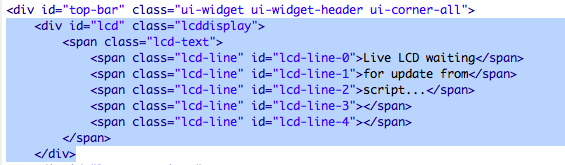
But after that, I am lost. I am unclear what to add to the main.js file. I found the refreshLCD function, but what would populate that with the data?
I am also unclear what to add to the brewpi.py file or where within that file.
Having the Tilt gravity in the LCD panel would be awesome for me! I greatly would appreciate any help on this!
Thanks
After struggling a while with a iSpindel I just received my Tilt. I got it running using a the TiltPi.
But I would love to have the readings from the Tilt in the brewpi graph. I can not get this working. I completed all the steps from the readme (https://github.com/sibowler/brewpi-brewometer/blob/master/README.md).
I use brewpi in the docker configuration and I updated brewpi before starting with the code below:
sudo apt-get install python-scipy python-numpy
sudo apt-get install bluez python-bluez python-scipy python-numpy libcap2-bin
sudo setcap cap_net_raw+eip $(eval readlink -f `which python`)
root@raspberrypi:/home/brewpi# python /home/brewpi/brewpi-brewometer/tiltHydrometer-test/TiltHydrometerTest.py
	(I get a reading from the tilt!)

root@raspberrypi:/home/brewpi# cp -r /home/brewpi/brewpi-brewometer/brewpi-web/. /var/www/html/
	(I can confirm that the items were copied)
sudo chown -R www-data:www-data /var/www/html/
root@raspberrypi:/home/brewpi# cp -r /home/brewpi/brewpi-brewometer/brewpi-script/. /home/brewpi/
	(I can confirm that the items were copied)
sudo chown -R root:root /home/brewpi
	(here I used root:root instead of brewpi:brewpi)
I refreshed the browser en started the script again, even after restarting the brewpi container I dont see the graph.
update 14-10
I found out that brewpi-web should be copied to www-data /var/www/html/ and not to www-data /var/www/
Now something has changed in the brewpi graph. I now see all the tilts, but not yet the reading from my tilt.
Does anybody have an idea what goes wrong?
Somehow I got it working now. Below some problems:
I found the problem. I needed to clear my cache in google chrome.
Sorry to took so long to check out your reply. I stepped through the README but still get errors.
Firstly "python-scipy : Depends: libstdc++6(>= 4.3.0) but it is not going to be installed
I tried installing libstdc++6 and am told that it already installed (6.3.0-18+rpi1+deb9u1) and that it breaks python-scipy
Stefan
@sbowler, I made all the file / directory changes but when I go to run the TiltHydrometerTest.py I get this:
root@a578f97090d0:/home/brewpi/tiltHydrometer-test# sudo setcap cap_net_raw+eip $(eval readlink -f `which python`)
root@a578f97090d0:/home/brewpi/tiltHydrometer-test# python TiltHydrometerTest.py
Scanning - 20 Secs (Control+C to exit early)
Red: None
Green: None
Black: None
Unhandled exception in thread started by <bound method TiltHydrometerManager.scan of <TiltHydrometer.TiltHydrometerManager instance at 0x749aa0f8>>Purple: None


Traceback (most recent call last):
  File "/home/brewpi/tiltHydrometer-test/TiltHydrometer.py", line 360, in scan
Orange: None
    Blue: None
blescan.hci_le_set_scan_parameters(sock)
Yellow: None
  File "/home/brewpi/tiltHydrometer-test/blescan.py", line 107, in hci_le_set_scan_parameters
Pink: None
    old_filter = sock.getsockopt( bluez.SOL_HCI, bluez.HCI_FILTER, 14)
_bluetooth.error: (9, 'Bad file descriptor')
Red: None
Green: None
Black: None
I feel I’m missing something simple.
Hey I have hit the same issue, by the looks of things the latest version of docker now includes a device flag, so I think you need to include the Bluetooth device in the docker start up script. The examples I saw were for USB Bluetooth dongles not built in Bluetooth. But I can confirm my docker images does not have any bluetooth devices. Run hcitool dev to check. I’ll post again once I figure out what to do.

